> ## Documentation Index
> Fetch the complete documentation index at: https://lightdash-docs-data-app-visualizations.mintlify.site/llms.txt
> Use this file to discover all available pages before exploring further.
# Rank in column
> Ranking values in a column is when you set every value as a number either higher than or lower than the other values. The lowest value (rank = 1) indicates the value with the first rank in your set of values.
[Just gimme the code! ](#here’s-the-sql-you-can-copy-paste-to-calculate-your-rank-in-column)
Here's an example of a percent change calculation:
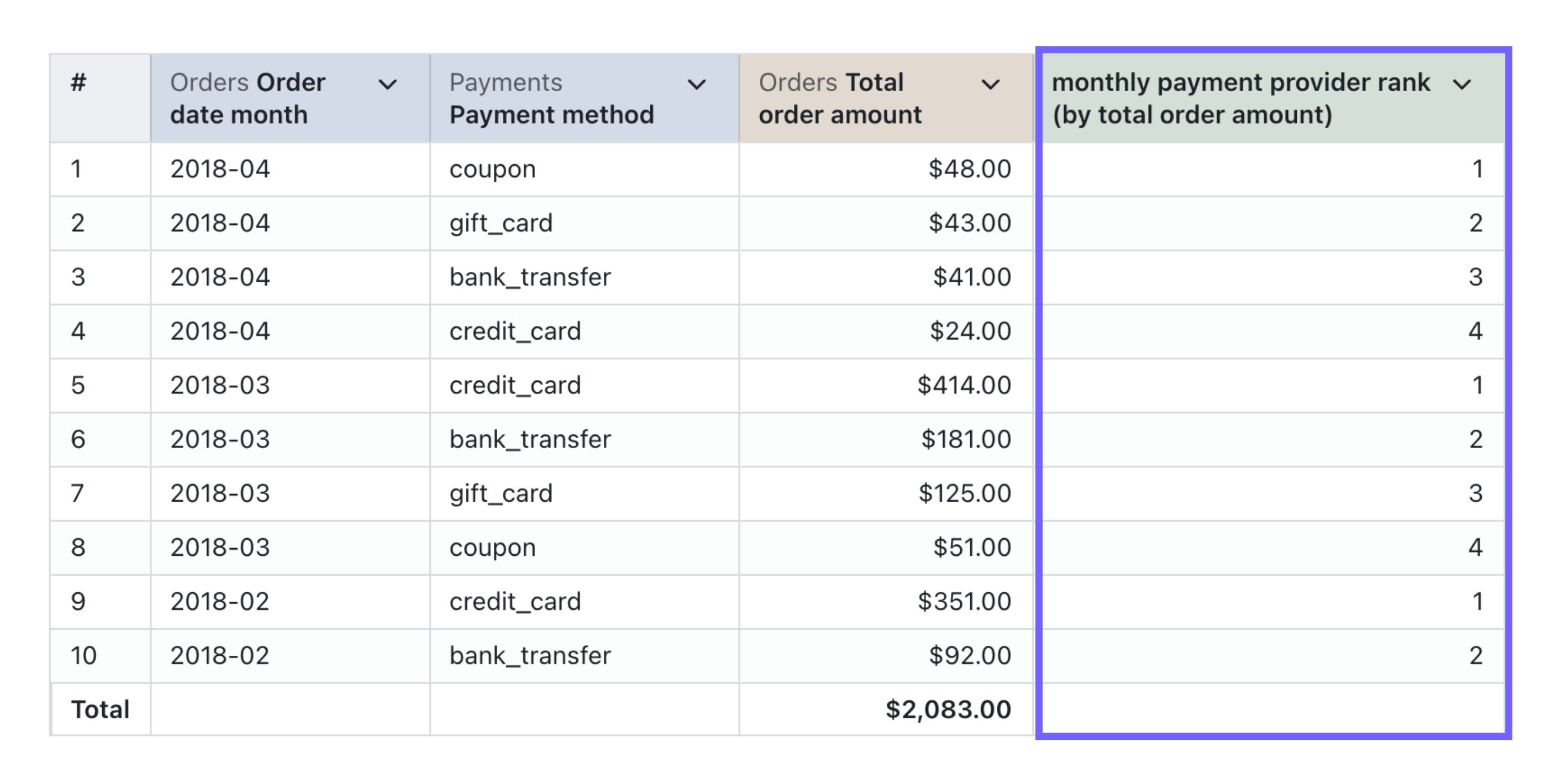 And here's the SQL used to generate it:
```sql theme={null}
ROW_NUMBER() OVER (
PARTITION BY
${orders.order_date_month}
ORDER BY
${orders.total_order_amount} DESC
)
```
In general, the SQL used for calculating the rank in a column has just one important column and one other important parameter:
* `column_i_want_to_rank` - this is the column that you want to rank
* `ASC` and `DESC` - if you want to have the **biggest values** with rank = 1, then you need to add `DESC` to your `ORDER BY` clause. If you want the **smallest values** with rank = 1 then you can add `ASC` to your `ORDER BY` clause (this isn't required, since the ordering is `ASC` by default).
### Here's the SQL you can copy-paste to calculate your rank in column
```sql theme={null}
ROW_NUMBER() OVER (
ORDER BY
${table.column_i_want_to_rank} DESC
)
```
And here's the SQL used to generate it:
```sql theme={null}
ROW_NUMBER() OVER (
PARTITION BY
${orders.order_date_month}
ORDER BY
${orders.total_order_amount} DESC
)
```
In general, the SQL used for calculating the rank in a column has just one important column and one other important parameter:
* `column_i_want_to_rank` - this is the column that you want to rank
* `ASC` and `DESC` - if you want to have the **biggest values** with rank = 1, then you need to add `DESC` to your `ORDER BY` clause. If you want the **smallest values** with rank = 1 then you can add `ASC` to your `ORDER BY` clause (this isn't required, since the ordering is `ASC` by default).
### Here's the SQL you can copy-paste to calculate your rank in column
```sql theme={null}
ROW_NUMBER() OVER (
ORDER BY
${table.column_i_want_to_rank} DESC
)
```